
Send reviewed business emails
Prepare personalised messages and send through an authorised SMTP account.
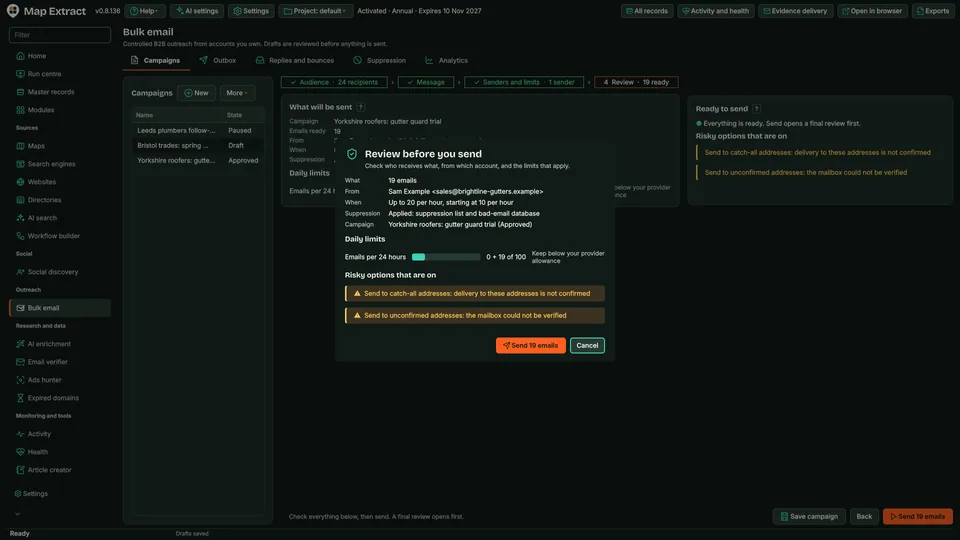
Draft a campaign from reviewed business records, approve the audience, and send through your own SMTP accounts within hourly, daily and monthly caps. Each recipient needs a recorded permission basis, every message must carry an opt-out, and the campaign pauses itself if bounces reach 5%.
The short versionNothing is sent until you approve it, and high bounces stop it.
A tool for sending reviewed B2B email campaigns from your own email accounts, with checks before anything goes out. Needs your SMTP setup.
Run email campaigns without a monthly email platform, while built-in checks help you stay careful. A sent status means your mail server accepted the message, not that it reached the inbox.
Nothing is sent until you approve it, and a recipient without recorded permission is held.
Step by step
The campaign stops itself if bounces rise.
Step by step
Prepare a campaign from records you have reviewed and send it through your own SMTP accounts. Nothing is sent until you approve the audience, and every message passes suppression, permission and opt-out checks first.
Real column names from the module schema. A field is filled only when its source publishes the value.
outbox_idcampaign_version_idrecipient_snapshot_idsender_identity_idto_addresssubjectplain_bodyhtml_bodycontent_hashidempotency_keystatescheduled_atleased_byleased_atcreated_atupdated_atYou provide Selected business contacts, an SMTP sender, subject and message.
You get Business email campaigns with recorded sending outcomes, replies and bounce information where configured.
Set the sender identity, subject and body, with merge fields and fallbacks. Creating a draft does not start delivery.
Choose recipients from reviewed records and approve the audience. Suppressed and excluded addresses are removed.
Each message is rendered from its record and checked for opt-out wording and approved links.
Recipients without a recorded permission basis are held as Needs review. Verification policy decides whether catch-all or unknown addresses may be sent to.
Approved messages go out through your SMTP routes within the caps and pacing you set.
IMAP reads replies and bounces. Opt-outs join the suppression list, and the campaign pauses if bounces reach the threshold.
| Business | City | Status | |
|---|---|---|---|
| Alder & Ash Interiors | hello@alderashinteriors.example | York | Queued |
| Studio Wren | hello@studiowren.example | York | Queued |
| Northgate Design | hello@northgatedesign.example | York | Queued |
| Oak & Elm Studio | hello@oakelmstudio.example | York | Queued |
| Bridge House Design | hello@bridgehousedesign.example | York | Queued |
| Northbank Interiors | hello@northbankinteriors.example | York | Queued |
| Willow Workshop | hello@willowworkshop.example | York | Queued |
| Parkside Rooms | hello@parksiderooms.example | York | Queued |
The software loads its business names, websites and contact details into your campaign.
Prepare personalised messages and send through an authorised SMTP account.
Find relevant local proposals for builders, roofers and other trades.
Use Map Extract lawfully and only for a legitimate purpose. Read the responsible use policy and the anti-spam policy before contacting anyone. Projects are stored locally on your Windows PC. Public business and social results the app collects are uploaded automatically to Map Extract's servers while it is licensed and running, as the Privacy Notice explains.
Your own SMTP account or accounts (credentials are stored in Windows Credential Manager), an IMAP inbox for replies and bounces, reviewed recipients and a recorded permission basis for each one. A Gemini key is optional, for drafting help.
No. A published address is not permission. Each recipient needs a permission record for that sender and channel, such as consent or, for UK corporate subscribers, a basis you have checked for that recipient. Read the anti-spam policy before you start.
Suppression at two points, opt-out wording in every message, approved links only, per-business and time caps, an optional warm-up, and an automatic pause when bounces reach 5% by default.
No. Set up and test your sending domain with your email provider before you start. Map Extract controls the list and the pace; the receiving service decides where a message lands.
No. Connect your own SMTP account or mail server. Your provider sets its own sending allowance and conditions.
Delivery and suppression history are kept, so an opted-out recipient stays suppressed.
Yes, using supported record fields and fallbacks. Inspect the rendered message, especially where company names or other details are absent.
The configured server accepted the submission. It does not prove inbox placement, a read or a reply. Review separate delivery, bounce and reply evidence where available.
Gmail returned 421 4.7.0 or 4.7.28? Tell TLS, rate and reputation deferrals apart, retry on a safe schedule and throttle per provider before it becomes a block.
Got 451 4.7.1 Greylisted, try again after some time? How greylisting works, when a correct retry gets through, and why some sending tools lose the email.
Every 535 5.7.139 variant from Microsoft 365 mapped to its cause and admin setting: SMTP AUTH per mailbox or tenant, security defaults, MFA and Basic auth.
Hit 550 5.4.5 daily user sending limit exceeded? Google's published limits for Gmail, Workspace and SMTP relay, how the 24-hour window works, and how to plan.
Microsoft 365 returned 550 5.7.708 access denied? Why new and trial tenants hit it, how it differs from 5.7.705 and 5.7.750, and the admin steps to recover.
554 5.7.5 permanent error evaluating DMARC policy almost always means a broken DNS record. Five broken DMARC records beside fixed ones, plus SPF limit checks.
Read the Bulk Email Sender guide, check the free demo status and the system requirements, then choose a licence for your Windows PC.