
Map Extract
Social automation · Preview

YouTube scraper for videos and channels, with optional engagement

Search YouTube by keyword to find videos, Shorts and channels in your niche, filter them by views, likes, subscribers and phrases, and save the details. Optional likes, comments and subscriptions run within daily limits you set; this module is in preview.

  • Windows desktop app
  • Data saved in your local project
  • 11 source fields

YouTube is a trademark of its owner. Map Extract is not affiliated with or endorsed by it.
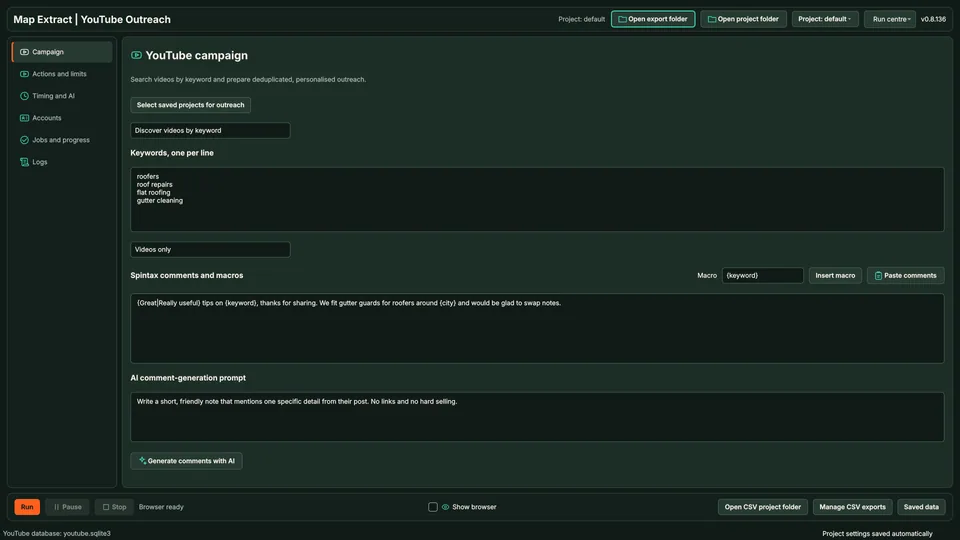
YouTube campaign settings with keywords, comment templates and an AI prompt

At a glance: YouTube Discovery and Engagement

The short versionFind the YouTube channels that matter in your niche.

What it is

A preview tool that finds YouTube videos and channels in your niche, with optional likes, comments and subscriptions under daily limits.

What it does

  • Searches YouTube by keyword for videos, Shorts and channels
  • Filters by views, likes, subscribers and phrases
  • Runs only the actions you enable, within daily limits

How it helps your business

Find channels and creators in your market to research, partner with or learn from. It is in preview, so treat it as early software, and platforms can restrict or suspend accounts.

Good for

  • Finding creators to partner with
  • Researching popular videos in a niche
  • Building a list of channels by subscriber count
  • Watching what competitors publish

Suitable for

  • Marketing agencies
  • Influencer agencies
  • Consumer brands
  • Course creators
  • Video producers
Plain English: what the terms mean (2 terms)
Preview
An early version you can try, with parts still being built and tested.
Scraping only
A setting, on by default, where the tool collects public details but does not follow, like or message anyone.

See it in action

Collect first; any action you enable runs inside daily limits you set.

Illustrative data. Beta module; platform limits and terms still apply. Motion is reduced, so the finished scene is shown.

Step by step

  1. Search a hashtag in the module's own browser profile.
  2. Profiles are collected with their bios, websites and any business email shown.
  3. Scraping only is on by default, so nothing is followed or messaged.
  4. You choose to enable follows, with a daily limit (10 a day by default).
  5. Follows run with delays between them; when the counter reaches the limit, the action stops for the day.
Fields and features

What you get

Find the channels that matter in your market and save their details. Engagement actions are optional and in preview.

Collect first, then act only within limits you set

  • Video and channel discoverySearch regular videos, Shorts or both and save video and channel details.
  • Metric and phrase filtersSet minimum views, likes and subscribers and phrases that must appear in titles or descriptions.
  • Saved audiencesReuse a saved audience without running a new search.
  • Daily limitsDefaults of 30 likes, 15 comments and 5 subscriptions a day, with repeat-channel suppression.
  • Comment draftsComments can be drafted with Gemini from the video details. Review them before enabling the action.
  • Checkpoints per videoProgress is saved per video so a stopped run can resume.

Field names11 field names

Real column names from the module schema. A field is filled only when its source publishes the value.

YouTube Discovery and Engagement record11Result record
  • id
  • url
  • title
  • channel_id
  • channel_name
  • channel_url
  • description
  • view_count
  • like_count
  • subscriber_count
  • comment_count
6 steps

How it works

You provide Video search keywords and public video or channel references.

You get Video and channel lead generation with source links and available audience metrics.

  1. Set the search

    Choose keywords and filters.

  2. Collect videos

    Matching videos and channels are saved.

  3. Save channel data

    Channel details are kept for later research.

  4. Prepare comments

    Templates or AI drafts are prepared for review.

  5. Run enabled actions

    Likes, comments or subscriptions run only if enabled, within daily limits.

  6. Save results

    Records and action history are saved locally.

YOUTUBE · DISCOVERY TO OUTREACH

Watch the software run the campaign

Set the search

Complete
● ● ●YouTube · Search↻
YouTube
Videos + ShortsBristolAutomatic queue
01small business bookkeeping tipsQueued ✓
02bookkeeping BristolQueued ✓
03bookkeeping businessesQueued ✓
Profile 02 · Saved cookiesAssigned proxy ✓

Choose keywords and filters.

1/6
Use cases

Where YouTube Discovery and Engagement fits

  • Influencer and digital creator sourcing
  • Social outreach
  • Social account growth and traffic

Lead Generation a creator niche

Find YouTube channels that publish videos about your products or industry.

Result: A researched list of videos and channels for manual assessment.

Prepare relevant comments

Keep each interaction connected to a video and avoid repeating it across a channel.

Result: An interaction history alongside the source video and channel information.

Responsible use

Safeguards and responsible use

Settings you control

Search audience
Set the keywords, accounts and supported discovery inputs for YouTube.
Automatic actions
Choose which comments and supported contact actions the campaign will run.
Message and timing
Set the templates, delays, action limits and repeat-contact cooldown.
Browser account
Select the saved YouTube identity and confirm its login.

Good to know

  • Scraping only is on by default. Actions run only when you enable them.
  • Third-party platforms may restrict data collection or automated actions. Before running a workflow, check the platform's rules and make sure you have permission for the actions you configure. Platforms can restrict or suspend accounts.
  • Daily caps and cooldowns reduce risk; they cannot prevent platform action against an account.

Use Map Extract lawfully and only for a legitimate purpose. Read the responsible use policy and the anti-spam policy before contacting anyone. Projects are stored locally on your Windows PC. Public business and social results the app collects are uploaded automatically to Map Extract's servers while it is licensed and running, as the Privacy Notice explains.

Questions

YouTube Discovery and Engagement FAQ

What do I need?

A browser profile signed in to a YouTube account you are authorised to use. A Gemini key is optional for comment drafts.

Can I just collect channel data?

Yes. Leave actions off and the module only collects and saves video and channel details.

What are the default limits?

30 likes, 15 comments and 5 subscriptions a day, with repeat-channel suppression.

Is engagement ready?

Engagement is in preview. Check results on YouTube and use conservative limits.

Is this allowed by YouTube?

Third-party platforms may restrict data collection or automated actions. Before running a workflow, check the platform's rules and make sure you have permission for the actions you configure. Platforms can restrict or suspend accounts.

Does this upload my videos?

No. Use YouTube Uploader for local video files, metadata and Studio publication. This module discovers videos and handles separately configured engagement.

Can it run a scraping-only workflow?

Yes. Leave engagement actions disabled and inspect the collected public video and channel information.

Will it grow my channel automatically?

It cannot promise growth, replies or audience interest. Use the research to find relevant conversations and review the purpose of any interaction.

Guides

Related guides

Start with one small run you can check

Read the YouTube Discovery and Engagement guide, check the free demo status and the system requirements, then choose a licence for your Windows PC.

Top