
Build a local trades digest
Give a trade business a relevant shortlist of potential work.
Result: A source-linked local opportunity digest. These are signals, not confirmed jobs.
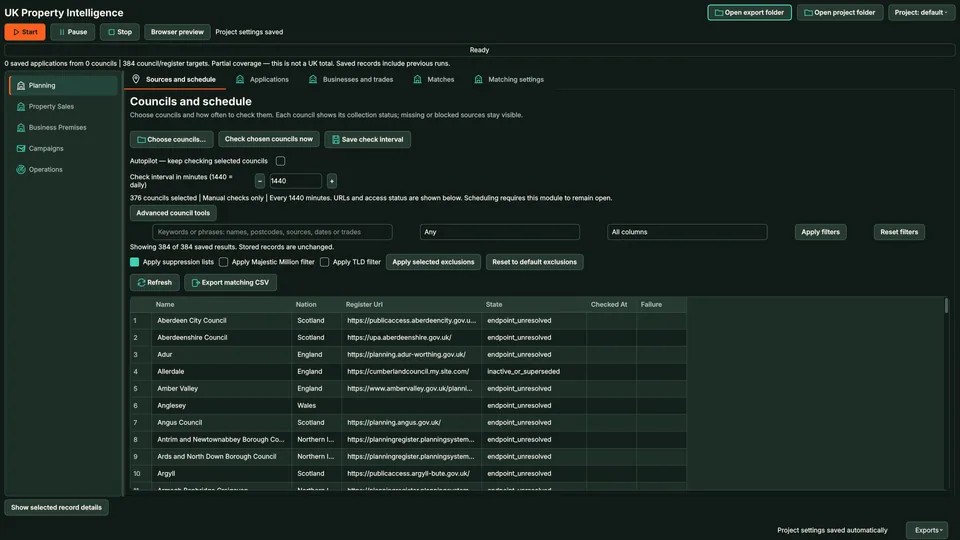
Collect planning applications from supported council portals, add Companies House and other evidence where you have collection rights, and match each application to trades that might do the work, with the reason shown. Digests reach the shared outbox only after you approve them exactly.
The short versionSpot local building projects early.
A beta tool that collects UK planning applications from supported council websites and matches them to local trades that might do the work.
Gives trades and suppliers early notice of building projects in their area. Council coverage varies, and applicant details never become an outreach list automatically.
A planning application becomes a possible job for the right local trade, with the reason shown.
Step by step
Planning applications matched to relevant trades with explainable reasons, ready for your review before any contact.
Real column names from the module schema. A field is filled only when its source publishes the value.
idauthority_idreferencedisplayed_referenceproperty_idstatusproposalreceived_datevalidated_datedecision_datesource_urlraw_idpayloadfingerprintfirst_seenlast_seenYou provide Council sources, authorised property files and imported trades businesses.
You get Local property opportunities matched to relevant businesses, with source evidence for review.
Watch the software process each stage automatically.
Give a trade business a relevant shortlist of potential work.
Result: A source-linked local opportunity digest. These are signals, not confirmed jobs.
Keep subscribed clients informed without recycling every old opportunity.
Result: Client-specific digests with recorded sending outcomes and new-item tracking.
Use Map Extract lawfully and only for a legitimate purpose. Read the responsible use policy and the anti-spam policy before contacting anyone. Projects are stored locally on your Windows PC. Public business and social results the app collects are uploaded automatically to Map Extract's servers while it is licensed and running, as the Privacy Notice explains.
No. The council registry is a list of targets, not proof of working nationwide collection. Check the current supported collectors and their status for your target area.
No. It is an opportunity signal. Review the work, status and relevance before deciding whether and how to approach a business.
Import a reviewed list or use appropriate businesses from a main scraper project. Check locality and trade categories before matching.
No. This is a local polling workflow. The Property window must remain open for its autopilot checks.
The workflow separates prospect and client communications and supports client targeting, cadence and subscription dates. Review the configured recipient and relevant opportunities before dispatch.
No. Sold STC and Under Offer are marketing statuses that can reverse. Completed-sale research uses separate evidence, including imported HM Land Registry Price Paid Data for England and Wales, whose publication can lag the transaction.
No. A registered office can be an accountant or formation agent. Companies House events stay research records until independent evidence links the company to the operating premises and a relevant activity.
Download the free Companies House Basic Company Data, open it without crashing Excel, and filter it by SIC code, status and postcode area with tested recipes.
Turn Companies House records into contactable UK B2B leads: free data products, the filters that matter, website matching and what the register cannot tell you.
What dormant means on Companies House, how to find dormant companies with the accounts category and SIC codes in bulk data, and when to exclude or hold them.
Three free ways to list new UK companies registered today: advanced search by incorporation date, the API search endpoint and the streaming API, plus a routine.
Which planning application types suit which trades, where to find them, when to make contact, applicant vs agent, and the UK rules for respectful contact.
Find which council handles a postcode, search its planning portal by postcode, address or map, cover several councils at once, and save searches for alerts.
Read the UK Property Intelligence guide, check the free demo status and the system requirements, then choose a licence for your Windows PC.