
Map Extract
Website testing · Coming soon

Website journey testing for sites you are authorised to test

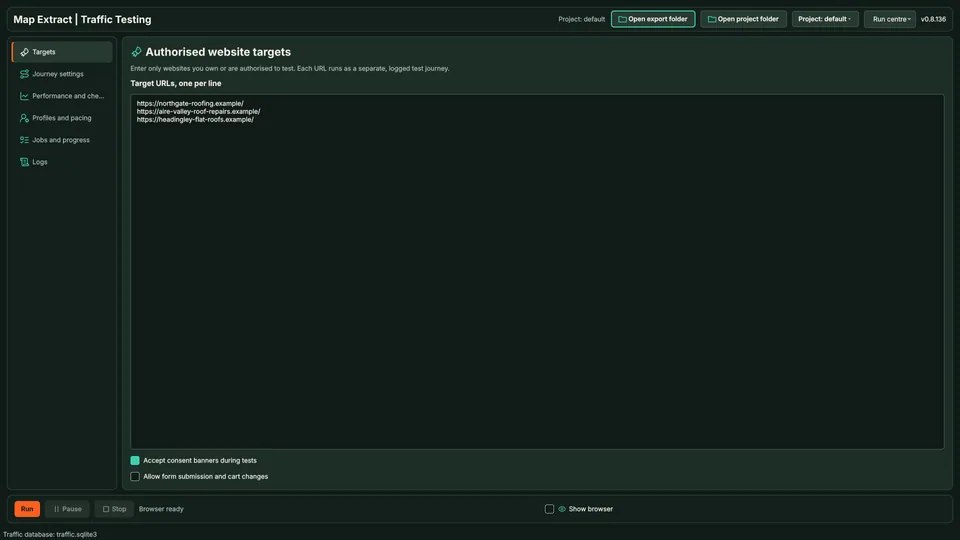
Add websites you own or may test. Map Extract builds journeys from same-site links, visits one to five pages with reading and scrolling steps, and records failed requests, console errors and timing. It refuses any site not on your allow-list and identifies itself as a test.
  • Windows desktop app
  • Data saved in your local project
  • Operational module
Authorised website targets for journey testing

At a glance: Website Journey Testing

The short versionComing soon: check your own site for broken pages.

What it is

Coming soon: a tool to test your own websites by visiting pages like a reader and recording errors and slow pages.

What it does

  • Visits same-site pages with reading and scrolling steps
  • Records failed requests, errors and page timing
  • Refuses any site not on your authorised list

How it helps your business

Will help you spot broken pages and errors on sites you own or are allowed to test. It is testing, not traffic: it does not create visitors, rankings or sales.

Good for

  • Checking your own site for errors
  • Testing a client's site with permission
  • Finding slow pages

Suitable for

  • Web designers
  • Marketing agencies
  • Ecommerce businesses
  • Website owners
Plain English: what the terms mean (2 terms)
Coming soon
Shown on the site so you know what is planned, but not part of the current release.
Console error
A technical error message a web page reports to the browser.

See it in action

Test journeys only on sites you are allowed to test.

Coming soon. Illustrative data. Testing, not traffic. Motion is reduced, so the finished scene is shown.

Step by step

  1. Add your own site to the allow-list and confirm you are authorised to test it. A site not on the list is refused.
  2. A journey of four pages from the same site is built in random order.
  3. Each page is visited with a scroll and a short pause.
  4. One page logs a failed image request and a console error.
  5. A report shows the timing for each page and the errors found.
Fields and features

What you get

Journey results for your own site with failed requests, console errors and page timing, to find what needs fixing.

Check how your own site behaves for a visitor, page by page

  • Define the website journeyEnter a site you control or are authorised to test and the navigation steps that matter.
  • Run the browser sequenceUse bounded steps, viewport settings and timing to replay the journey.
  • Record failures and performanceInspect journey results, performance samples and broken links where collected.
  • Use evidence to fix the siteFollow the failed step back to the page or element involved, then rerun the relevant test after a fix.

Field names9 field names

Real column names from the module schema. A field is filled only when its source publishes the value.

Website Journey Testing record9Saved record
  • id
  • target_origin
  • viewport
  • state
  • automated_user_agent
  • started_at
  • completed_at
  • quality_score
  • last_error
5 steps

How it works

You provide Website URLs, navigation steps and test limits.

You get Results that help locate broken journeys and investigate website failures.

  1. Open the start page

  2. Perform each saved click, entry or navigation step

  3. Wait for the expected page state

  4. Capture screenshots and errors when a step fails

  5. Review the run history

SEE THE TASK, SETTINGS AND RESULT

Website Journey Testing: follow a worked example

● ● ●Website Journey TestingProject workspace
thames-dental.example
THAMES DENTAL

Book an appointment

Choose a time to visit our Walton practice.

Monday, 10:00
New patient appointment
Continue to booking

Automated workflow. Playing it does not open accounts, send email, publish files or run tests.

Use cases

Where Website Journey Testing fits

  • Website testing
  • Automation and developer workflows

Check a website journey

Inspect how a visitor could move through pages you operate.

Result: Recorded navigation observations that identify steps needing investigation.

Repeat after a site change

Revisit the same configured journey after editing the website.

Result: A fresh journey record for review. This does not replace a full website audit.

Responsible use

Safeguards and responsible use

Settings you control

Target websites
Add the sites you own or are authorised to test.
Journey steps
Set the pages, actions and time limits.
Results
Inspect the recorded step outcomes and failures.

Good to know

  • Runs only on sites in your allow-list marked as authorised; others are refused.
  • Journeys follow same-site links in random order, with optional paths or page labels you want included. Form submission and cart changes are off by default.
  • This is testing, not traffic. It does not create visitors, rankings or sales.

Use Map Extract lawfully and only for a legitimate purpose. Read the responsible use policy. Projects are stored locally on your Windows PC. Public business and social results the app collects are uploaded automatically to Map Extract's servers while it is licensed and running, as the Privacy Notice explains.

Questions

Website Journey Testing FAQ

Can I script a step-by-step journey, such as a purchase?

Not as a step-by-step script. Journeys follow same-site links with optional paths or page labels you want exercised. Form submission and cart changes are off unless you enable them.

How does it identify itself?

With the user agent MapExtract-Authorised-Synthetic-Test/1.0, so your analytics and logs can filter it out.

Is this a hosted cross-browser testing service?

No. It is a local configured browser workflow, not a cloud device farm covering every browser and operating system.

Will this improve my search ranking or create customers?

No. Synthetic test journeys are for checking a website. They are not genuine visitors, ad performance or evidence of market demand.

What do I need to supply?

Provide authorised URLs and the intended journey settings. Start with a small run and inspect the resulting observations.

Can it replace a full website QA process?

No. Use it as one check alongside real user flows, accessibility, responsive layout and other testing appropriate to your site.

What should I test first?

Start with a key section of your site, such as product or service pages. Add the optional paths you want exercised, run a small test and check the recorded observations.

Does a completed test prove every page works?

No. It records the journey and conditions you tested. Other pages, accounts, browsers or data may behave differently.

Start with one small run you can check

Read the Website Journey Testing guide, check the free demo status and the system requirements, then choose a licence for your Windows PC.

Top