
Keep client accounts separate
Reuse authorised browser sessions while keeping account identities distinct.
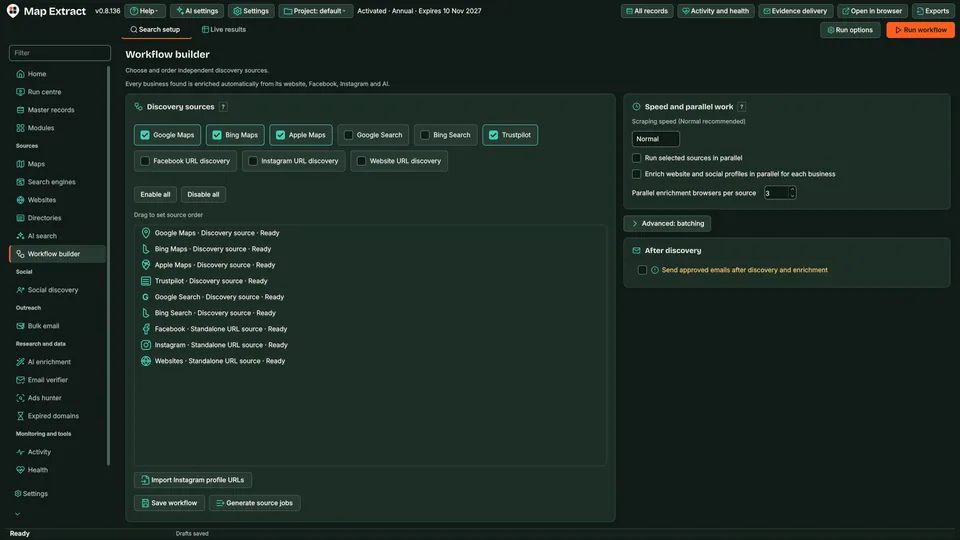
Choose from nine sources (Google, Bing and Apple Maps, Google and Bing search, Trustpilot, Facebook, Instagram and website crawling), set their order and which are on, and save the recipe. Up to nine source workers can run at once, each in its own browser and taking turns.
The short versionSet up your search once, then reuse it.
A tool for saving which data sources you use, and in what order, as a recipe you can run again.
Set up a search the way you like it once, then repeat it for new areas or niches without starting from scratch. More sources at once use more memory, so start with a small test run.
Save the order of your sources once and reuse it.
Step by step
A saved, reusable collection recipe that runs your chosen sources in order and merges what they find into one project.
Real column names from the module schema. A field is filled only when its source publishes the value.
sources_enabledsource_orderkeywords_per_source_before_switchwebsite_batch_sizemax_concurrent_sourcesdelay_between_sources_mstimeout_jitter_msrespect_rate_limitstrustpilot_countriesYou provide Supported source steps and saved search settings.
You get A repeatable process for collecting and enriching business data.
One business, from a search result to a checked record you can export.
Step by step
Add keywords and locations, choose your sources and set the job order and limits. The software runs the configured searches, extracts available business details, visits linked websites and social profiles, and joins matching details in your local database. Then start an automated outreach campaign using those contacts.
Interactive example. Source availability, source order, batch sizes and configured limits determine the actual run. Organic search jobs retain their own search filters.
Each saved identity keeps its platform sessions and cookies. Public-page warm-up is available for browser profiles. Select that identity in a supported module; complete-profile rotation switches at supported handover points.
Reuse authorised browser sessions while keeping account identities distinct.
Prepare a defined sequence of supported discovery and extraction steps.
Use Map Extract lawfully and only for a legitimate purpose. Read the responsible use policy. Projects are stored locally on your Windows PC. Public business and social results the app collects are uploaded automatically to Map Extract's servers while it is licensed and running, as the Privacy Notice explains.
Google Maps, Bing Maps, Apple Maps, Google search, Bing search, Trustpilot, Facebook, Instagram and website crawling. You set their order and which ones are enabled.
Yes. Up to nine source workers can run at once, each with its own browser, taking turns of about two minutes and sharing one queue.
No. It coordinates supported Map Extract discovery and extraction steps. It does not claim arbitrary integrations, custom API actions or every possible module combination.
Yes. Save the relevant source inputs and limits before running the combined workflow.
Saving the setup and executing it are separate operations. Review the selected project and inputs before starting.
Use the core business records and job views for the selected project, then review and export the records you need.
No. The saved workflow controls supported discovery sources and website batches. Standalone outreach and publishing modules have their own campaign controls.
It saves enabled sources, source order, queries before switching, website batch size, concurrency, delays and rate-limit preferences.
Why unsourced AI lead fields are risky, how grounding each value with a source URL and quote works, missing-only research, and a weekly review routine.
Seeing é, £ or ’ in a CSV opened in Excel? It is UTF-8 read as the wrong encoding. Import it as UTF-8, understand the BOM and save it back safely.
How to deduplicate business leads: which keys to trust in which order, fuzzy name rules, branches and chains, and merge rules that keep evidence and opt-outs.
Stop Excel stripping the 0 from UK phone numbers: import the CSV as text, switch off automatic conversion, repair damaged columns and store numbers as +44.
Operator recipes for finding B2B prospects in any niche, how to keep directories and marketplaces out, country and language settings and repeatable lists.
Search recipes to find wholesalers and distributors in any niche, how to tell manufacturers, distributors and retailers apart, and what to check first.
Read the Scraping Workflow Builder guide, check the free demo status and the system requirements, then choose a licence for your Windows PC.