
Build a B2B prospect list
Get company names, locations, websites and available public contacts in a consolidated business list.
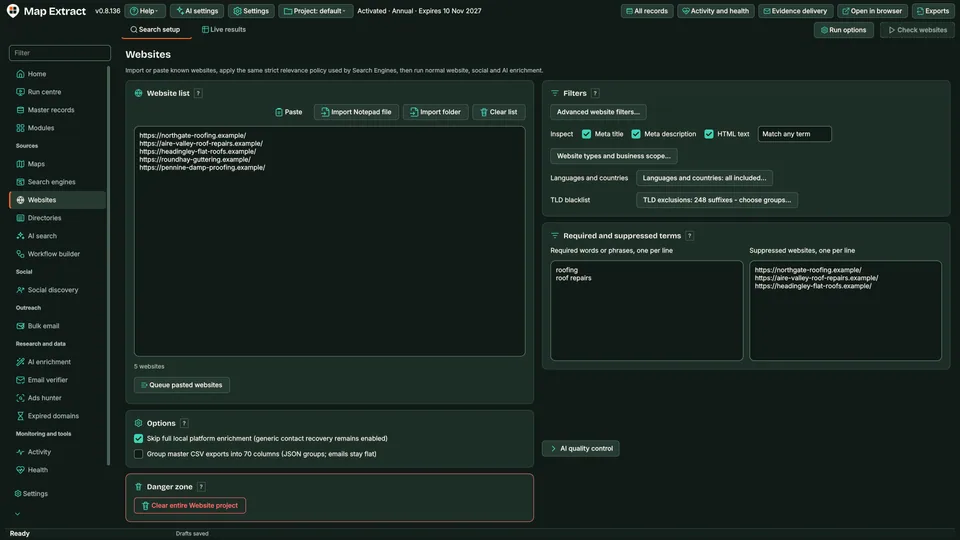
Paste or import a list of domains, or use websites found by other sources. Map Extract checks each site, reads robots.txt, crawls the pages that matter most and saves public contacts, structured business data, legal identifiers and technology signals, then looks for a matching Maps listing and social profiles.
The short versionStart with a list of websites, finish with business records.
A tool that visits a list of business websites and copies their published contact and company details into records.
Start from websites you already have, such as a trade show list or customer list, and finish with fuller records your team can use, each detail tied to the page it came from.
Start with a list of websites and finish with complete business records.
"@type": "LocalBusiness"Step by step
One record per website with public contacts, JSON-LD business data, company and VAT numbers where published, technology and hosting signals, a matching Maps listing and social profiles.
Real column names from the module schema. A field is filled only when its source publishes the value.
site_input_valuesite_domainsite_registrable_domainsite_effective_domainsite_effective_urlsite_domain_match_statussite_statussite_http_statussite_response_time_mssite_redirectedsite_redirect_chainsite_parkedsite_parked_providersite_blockedsite_block_typesite_captcha_detectedsite_robots_allowedsite_meta_titlesite_meta_descriptionsite_canonical_urlsite_languagesite_cmssite_cms_confidencesite_frameworksite_ecommerce_platformsite_serversite_cdnsite_wafsite_ipsite_ipv6site_asnsite_hostingsite_nameserverssite_tldsite_tld_typesite_country_inferredsite_country_inference_sourcesite_ssl_validsite_ssl_expirysite_jsonld_typessite_jsonld_business_namesite_jsonld_legal_namesite_jsonld_descriptionsite_jsonld_logo_urlsite_jsonld_image_urlsite_jsonld_addresssite_jsonld_street_addresssite_jsonld_postcodesite_jsonld_citysite_jsonld_regionsite_jsonld_countrysite_jsonld_latitudesite_jsonld_longitudesite_jsonld_phonesite_jsonld_emailsite_jsonld_whatsappsite_jsonld_telegramsite_company_numbersite_vat_numbersite_phone_1site_phone_2site_whatsappsite_telegramsite_social_facebooksite_social_instagramsite_social_tiktoksite_social_xsite_social_linkedinsite_social_youtubesite_social_pinterestsite_social_threadssite_social_snapchatsite_trustpilot_urlsite_google_maps_urlsite_contact_pagesite_about_pagesite_privacy_pagesite_terms_pagesite_registration_pagesite_login_pagesite_booking_pagesite_sitemap_urlsite_favicon_urlsite_logo_urlsite_ads_facebooksite_ads_instagramsite_ads_tiktoksite_ads_googlesite_ads_adsensesite_google_analyticssite_google_tag_managersite_meta_pixelsite_tiktok_pixelsite_linkedin_insightsite_business_category_detectedsite_restricted_content_categoryemail_1email_1_typeemail_1_source_urlemail_1_confidenceemail_2email_2_typeemail_2_source_urlemail_2_confidenceemail_3email_3_typeemail_3_source_urlemail_3_confidenceemail_4email_4_typeemail_4_source_urlemail_4_confidenceemail_5email_5_typeemail_5_source_urlemail_5_confidenceemail_6email_6_typeemail_6_source_urlemail_6_confidenceemail_7email_7_typeemail_7_source_urlemail_7_confidenceemail_8email_8_typeemail_8_source_urlemail_8_confidenceemail_9email_9_typeemail_9_source_urlemail_9_confidenceemail_10email_10_typeemail_10_source_urlemail_10_confidenceemail_countemail_typesfb_page_idfb_page_urlfb_usernamefb_page_namefb_categoryfb_additional_categoriesfb_verifiedfb_logo_urlfb_featured_image_urlfb_addressfb_cityfb_regionfb_postcodefb_countryfb_latitudefb_longitudefb_phonefb_emailfb_websitefb_domainfb_whatsappfb_foundedfb_followersfb_followingfb_likesfb_ratingfb_total_reviewsfb_opening_hoursfb_price_rangefb_aboutfb_descriptionfb_servicesfb_service_areafb_instagram_urlfb_messenger_urlfb_last_public_activityfb_external_linksfb_domain_match_scorefb_match_reasonfb_has_pageig_profile_idig_urlig_usernameig_display_nameig_verifiedig_profile_image_urlig_bioig_followersig_followingig_total_postsig_websiteig_domainig_categoryig_business_emailig_business_phoneig_business_addressig_facebook_urlig_last_public_activityig_external_linksig_link_hub_urlig_domain_match_scoreig_match_reasonig_has_profileYou provide A list of business URLs or websites found by the other scrapers.
You get A local B2B database with business contacts, website and social details, ready for CSV export and reviewed outreach.
Each domain is checked for DNS and reachability. Disallowed pages in robots.txt are skipped. Fast reads the homepage, Balanced reads menus, footer and key pages (up to 15) and Deep follows two link levels (20 by default, up to 50). Contact, about, services, booking, pricing and policy pages come first.
Starting from the website, Map Extract plans up to seven Maps lookups from the site's own evidence (domain, name with postcode or city, phone, address) and accepts a listing only when its website domain matches. Eligible Facebook and Instagram profiles are then checked against the same business.
Optional AI research fills gaps for eligible fields where evidence is available. Each accepted value keeps its source URL and supporting passage; unsupported suggestions stay blank. Layer 3 can add extra facts the website states, and foreign-language descriptions gain an English version beside the original.
Check each record, its sources and its state: captured, enriched, held for review or ready to send. Every email address carries an inbox purpose, such as sales or bookings, and a verification verdict that says which checks were run.
Export approved records as CSV, XLSX or JSONL, filtered by quality, source and date, or pass them to an outreach module. Outreach keeps its own permission checks, suppression and approval steps.
The software queues your websites for crawling
Each domain is checked for DNS and reachability. Disallowed pages in robots.txt are skipped. Fast reads the homepage, Balanced reads menus, footer and key pages (up to 15) and Deep follows two link levels (20 by default, up to 50). Contact, about, services, booking, pricing and policy pages come first.Map Extract prepares jobs from your keywords, locations or imported URLs.
Get company names, locations, websites and available public contacts in a consolidated business list.
Add published emails, phone numbers and social links to selected business records.
Prepare personalised messages and send through an authorised SMTP account.
Use Map Extract lawfully and only for a legitimate purpose. Read the responsible use policy. Projects are stored locally on your Windows PC. Public business and social results the app collects are uploaded automatically to Map Extract's servers while it is licensed and running, as the Privacy Notice explains.
A list of domains or URLs (pasted or imported), Map Extract on a Windows PC and an internet connection. Duplicate handling, subdomain filters and email and domain blocklists are set before the run.
Yes. robots.txt is read and disallowed pages are skipped. Privacy and terms pages may still be read so legal details can be recorded. A site that blocks access or shows a CAPTCHA is recorded as blocked, and quarantined domains are retried only when you choose.
Yes, as a UK workflow. A company number or name found on the site can be used to look for a registry match, which records registered office, status and status history. Use of the Companies House API needs your own free API key.
No. Collection, website crawling, matching and export work without AI. AI enrichment, Layer 3 and English translations need a configured provider, such as your own Gemini API key, a local LM Studio model or a browser AI route, and that provider's own terms and charges apply.
Map Extract saves what each source publishes and keeps the source link beside it. Listings are attached by matching website domains, results from the wrong area are flagged, and AI values need a supporting passage before they are saved. Sources change and can be incomplete, so review records before you rely on them.
Projects are stored locally on your Windows PC in a SQLite database, and you choose what to export. Runs send requests to the sources you enable and, if you turn AI on, your prompt and the chosen context go to the AI provider you select. Public business and social results the app collects are uploaded automatically to Map Extract's servers while it is licensed and running; the Privacy Notice explains this.
Map Extract visits the website and its accessible contact pages. It extracts published emails, phone numbers, addresses and links automatically.
Map Extract reads website HTML, contact pages and JSON-LD, detects CMS signals and follows linked Facebook and Instagram sources. Matching details are added to the same business record.
Why Google shows 'Our systems have detected unusual traffic from your computer network', what causes it, and the right response when you run lead collection.
Why unsourced AI lead fields are risky, how grounding each value with a source URL and quote works, missing-only research, and a weekly review routine.
Why a site shows [email protected] or links to /cdn-cgi/l/email-protection, how Cloudflare hides addresses, other obfuscation styles and forms-only sites.
Download the free Companies House Basic Company Data, open it without crashing Excel, and filter it by SIC code, status and postcode area with tested recipes.
Turn Companies House records into contactable UK B2B leads: free data products, the filters that matter, website matching and what the register cannot tell you.
Seeing é, £ or ’ in a CSV opened in Excel? It is UTF-8 read as the wrong encoding. Import it as UTF-8, understand the BOM and save it back safely.
Read the Website Data Extractor guide, check the free demo status and the system requirements, then choose a licence for your Windows PC.