
Catch-All on Microsoft 365 and Google: Why Checks Fail
Why email verifiers report catch-all or unknown for Microsoft 365, Google Workspace and gateway-protected domains, what signals still help, and a send policy.
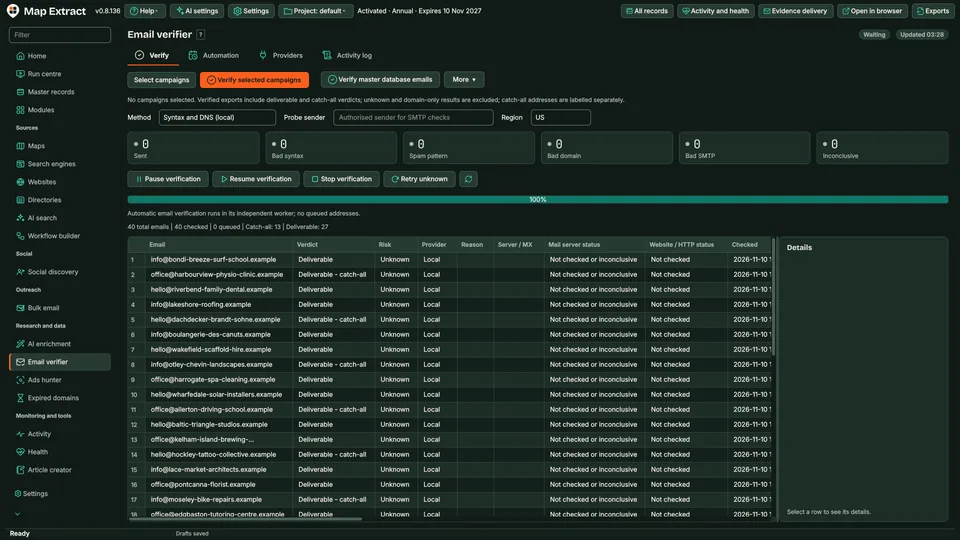
Check extracted or imported business email addresses for syntax and mail routing, add mailbox signals where you configure them, and keep each address labelled by inbox purpose. Catch-all and inconclusive results get their own labels, and a verdict describes the checks that ran, not guaranteed delivery.
The short versionSee how far each email address was checked before you send.
A tool that checks business email addresses and tells you, in plain labels, how far each one could be checked.
Removing invalid addresses can reduce bounces, which helps protect your sending reputation. A result describes the checks that ran; it cannot promise delivery or a reply.
Know which inbox you are writing to and how far its address was checked.
Step by step
Business email addresses labelled by verdict and inbox purpose, with the reasons for each result.
You provide Business email addresses from your project records, a website crawl or an imported list.
You get Each address with a verdict, its reasons and an inbox purpose label, ready for review or export.
Use Map Extract lawfully and only for a legitimate purpose. Read the responsible use policy. Projects are stored locally on your Windows PC. Public business and social results the app collects are uploaded automatically to Map Extract's servers while it is licensed and running, as the Privacy Notice explains.
Syntax and mail routing for every address, and optional mailbox signals where you configure a probe sender. Each verdict is saved with its reasons.
No. A verdict describes the checks that ran, not guaranteed delivery or a reply. Mailbox providers can still reject or filter a message.
The domain accepts mail for any address, so a single mailbox cannot be confirmed there. Catch-all results get their own label and your sending policy decides whether to use them.
The mail server did not give a clear answer, or your internet connection blocks mailbox checks. Inconclusive results are labelled rather than counted as valid or invalid.
A label kept separate from verification that says what an address is for, such as general enquiries, sales, bookings or support. Privacy, abuse, unsubscribe and no-reply addresses are excluded from outreach.
No. Bulk Email Sender holds any recipient without a recorded permission basis, whatever the verification verdict.
Why email verifiers report catch-all or unknown for Microsoft 365, Google Workspace and gateway-protected domains, what signals still help, and a send policy.
What each email verification result means, which check produced it and what it cannot prove, with a send, hold or skip table for B2B outreach lists.
Free ways to find the email addresses a business publishes on its domain, ranked by reliability, plus when pattern guessing is safe and how to do it in bulk.
Check whether an email address exists without sending a message: the SMTP RCPT TO conversation line by line, why port 25 fails, catch-all tests and etiquette.
Read the Email Verifier guide, check the free demo status and the system requirements, then choose a licence for your Windows PC.