
Build a B2B prospect list
Get company names, locations, websites and available public contacts in a consolidated business list.
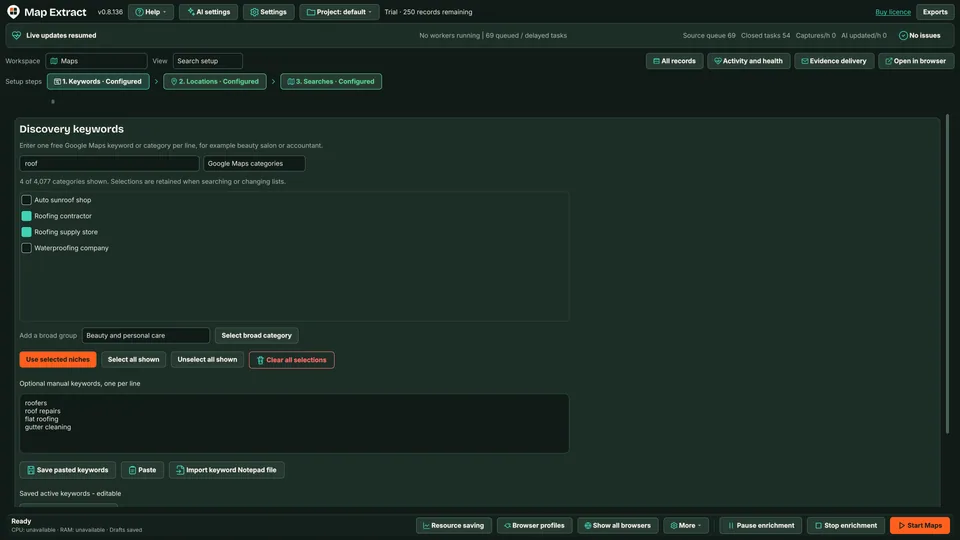
Enter keywords and locations. Map Extract searches Bing Maps centred on each place, pages through the results with Bing's own controls and reads each business panel. It then crawls the websites and attaches matching social profiles to the same record.
Microsoft Bing is a trademark of its owner. Map Extract is not affiliated with or endorsed by it.
The short versionA second map for a fuller local list.
A tool that searches Bing Maps for the businesses and places you choose and saves each listing's public details.
Running Bing Maps alongside other map sources gives you a second view of each area, and you can see which search found each record.
Every pin you can see on the map becomes a row you can check.
Step by step
gm_business_name, gm_category, gm_phone.One record per business with Bing Maps listing fields, chain detection, the keyword and location used, the website and matching social profiles.
Real column names from the module schema. A field is filled only when its source publishes the value.
bing_source_idbing_business_namebing_categorybing_additional_categoriesbing_aboutbing_phonebing_websitebing_domainbing_address_rawbing_citybing_regionbing_postcodebing_country_codebing_latitudebing_longitudebing_ratingbing_total_reviewsbing_price_levelbing_opening_hoursbing_statusbing_logo_urlbing_imagesbing_maps_urlbing_keyword_usedbing_search_location_usedbing_entity_typebing_confidencebing_web_search_urlbing_is_chainbing_geocode_methodbing_has_listingemail_1email_1_typeemail_1_source_urlemail_1_confidenceemail_2email_2_typeemail_2_source_urlemail_2_confidenceemail_3email_3_typeemail_3_source_urlemail_3_confidenceemail_4email_4_typeemail_4_source_urlemail_4_confidenceemail_5email_5_typeemail_5_source_urlemail_5_confidenceemail_6email_6_typeemail_6_source_urlemail_6_confidenceemail_7email_7_typeemail_7_source_urlemail_7_confidenceemail_8email_8_typeemail_8_source_urlemail_8_confidenceemail_9email_9_typeemail_9_source_urlemail_9_confidenceemail_10email_10_typeemail_10_source_urlemail_10_confidenceemail_countemail_typessite_input_valuesite_domainsite_registrable_domainsite_effective_domainsite_effective_urlsite_domain_match_statussite_statussite_http_statussite_response_time_mssite_redirectedsite_redirect_chainsite_parkedsite_parked_providersite_blockedsite_block_typesite_captcha_detectedsite_robots_allowedsite_meta_titlesite_meta_descriptionsite_canonical_urlsite_languagesite_cmssite_cms_confidencesite_frameworksite_ecommerce_platformsite_serversite_cdnsite_wafsite_ipsite_ipv6site_asnsite_hostingsite_nameserverssite_tldsite_tld_typesite_country_inferredsite_country_inference_sourcesite_ssl_validsite_ssl_expirysite_jsonld_typessite_jsonld_business_namesite_jsonld_legal_namesite_jsonld_descriptionsite_jsonld_logo_urlsite_jsonld_image_urlsite_jsonld_addresssite_jsonld_street_addresssite_jsonld_postcodesite_jsonld_citysite_jsonld_regionsite_jsonld_countrysite_jsonld_latitudesite_jsonld_longitudesite_jsonld_phonesite_jsonld_emailsite_jsonld_whatsappsite_jsonld_telegramsite_company_numbersite_vat_numbersite_phone_1site_phone_2site_whatsappsite_telegramsite_social_facebooksite_social_instagramsite_social_tiktoksite_social_xsite_social_linkedinsite_social_youtubesite_social_pinterestsite_social_threadssite_social_snapchatsite_trustpilot_urlsite_google_maps_urlsite_contact_pagesite_about_pagesite_privacy_pagesite_terms_pagesite_registration_pagesite_login_pagesite_booking_pagesite_sitemap_urlsite_favicon_urlsite_logo_urlsite_ads_facebooksite_ads_instagramsite_ads_tiktoksite_ads_googlesite_ads_adsensesite_google_analyticssite_google_tag_managersite_meta_pixelsite_tiktok_pixelsite_linkedin_insightsite_business_category_detectedsite_restricted_content_categoryfb_page_idfb_page_urlfb_usernamefb_page_namefb_categoryfb_additional_categoriesfb_verifiedfb_logo_urlfb_featured_image_urlfb_addressfb_cityfb_regionfb_postcodefb_countryfb_latitudefb_longitudefb_phonefb_emailfb_websitefb_domainfb_whatsappfb_foundedfb_followersfb_followingfb_likesfb_ratingfb_total_reviewsfb_opening_hoursfb_price_rangefb_aboutfb_descriptionfb_servicesfb_service_areafb_instagram_urlfb_messenger_urlfb_last_public_activityfb_external_linksfb_domain_match_scorefb_match_reasonfb_has_pageig_profile_idig_urlig_usernameig_display_nameig_verifiedig_profile_image_urlig_bioig_followersig_followingig_total_postsig_websiteig_domainig_categoryig_business_emailig_business_phoneig_business_addressig_facebook_urlig_last_public_activityig_external_linksig_link_hub_urlig_domain_match_scoreig_match_reasonig_has_profileYou provide Business keywords, locations and the Bing Maps source.
You get A local B2B database with business contacts, website and social details, ready for CSV export and reviewed outreach.
Each keyword and location becomes one Bing Maps search, centred on the place when its coordinates are known. Results are re-read on every page so a recycled card is not counted twice, and an empty result is confirmed before it is recorded as zero.
Map Extract crawls the business website at the level you choose (Fast, Balanced or Deep) and checks eligible public Facebook, Instagram and YouTube profiles. A listing or profile is attached only when its website domain and other evidence match, and the match reason is stored.
Optional AI research fills gaps for eligible fields where evidence is available. Each accepted value keeps its source URL and supporting passage; unsupported suggestions stay blank. Layer 3 can add extra facts the website states, and foreign-language descriptions gain an English version beside the original.
Check each record, its sources and its state: captured, enriched, held for review or ready to send. Every email address carries an inbox purpose, such as sales or bookings, and a verification verdict that says which checks were run.
Export approved records as CSV, XLSX or JSONL, filtered by quality, source and date, or pass them to an outreach module. Outreach keeps its own permission checks, suppression and approval steps.
One business, from a search result to a checked record you can export.
Step by step
The software builds and runs your search queue
Each keyword and location becomes one Bing Maps search, centred on the place when its coordinates are known. Results are re-read on every page so a recycled card is not counted twice, and an empty result is confirmed before it is recorded as zero.Map Extract prepares jobs from your keywords, locations or imported URLs.
Get company names, locations, websites and available public contacts in a consolidated business list.
Use Map Extract lawfully and only for a legitimate purpose. Read the responsible use policy. Projects are stored locally on your Windows PC. Public business and social results the app collects are uploaded automatically to Map Extract's servers while it is licensed and running, as the Privacy Notice explains.
Different map sources list different businesses and fields. Running both for the same area and merging the results can fill gaps that one source leaves. Map Extract merges matching observations into one business record.
Map Extract on a Windows PC, an internet connection, and your keywords and locations. No Bing account is needed. Proxies and an AI key are optional.
Yes. Bing listings carry a chain flag, which Map Extract saves, so you can filter branches of national chains out of a local list.
Map Extract saves what each source publishes and keeps the source link beside it. Listings are attached by matching website domains, results from the wrong area are flagged, and AI values need a supporting passage before they are saved. Sources change and can be incomplete, so review records before you rely on them.
Projects are stored locally on your Windows PC in a SQLite database, and you choose what to export. Runs send requests to the sources you enable and, if you turn AI on, your prompt and the chosen context go to the AI provider you select. Public business and social results the app collects are uploaded automatically to Map Extract's servers while it is licensed and running; the Privacy Notice explains this.
Map Extract searches Bing Maps, scrolls the result list and opens business cards. It saves published listing details and passes website URLs to the crawler.
Map Extract reads website HTML, contact pages and JSON-LD, detects CMS signals and follows linked Facebook and Instagram sources. Matching details are added to the same business record.
Map Extract saves business records in a local SQLite database on your Windows computer. Export selected records to CSV for your CRM or use them in the outreach modules. Requests to Gemini and other configured services use those services separately.
Google Maps listings have no email field. Learn where Maps email extractors really find addresses, how to measure your hit rate and how to verify the results.
How to find local business leads on Google Maps: pick terms and areas, beat the visible result cap, enrich websites, verify emails and stay within the rules.
Why Google Maps stops at about 120 results and the Places API at 60, and how splitting by area and category, then removing duplicates, recovers the rest.
How to grid search Google Maps: choose cell size and zoom for dense and rural areas, split only cells that hit the cap, expect duplicates and check geography.
A method for web designers: find local businesses with no website on Google Maps, weed out false positives, add dead and parked sites, then pitch lawfully.
Read the Bing Maps Scraper guide, check the free demo status and the system requirements, then choose a licence for your Windows PC.