
Pitch a new lead generation finding
Send each journalist a personalised press release pitch based on the topics they cover.
Result: Each journalist's contact details, personalised press release pitch and sending status.
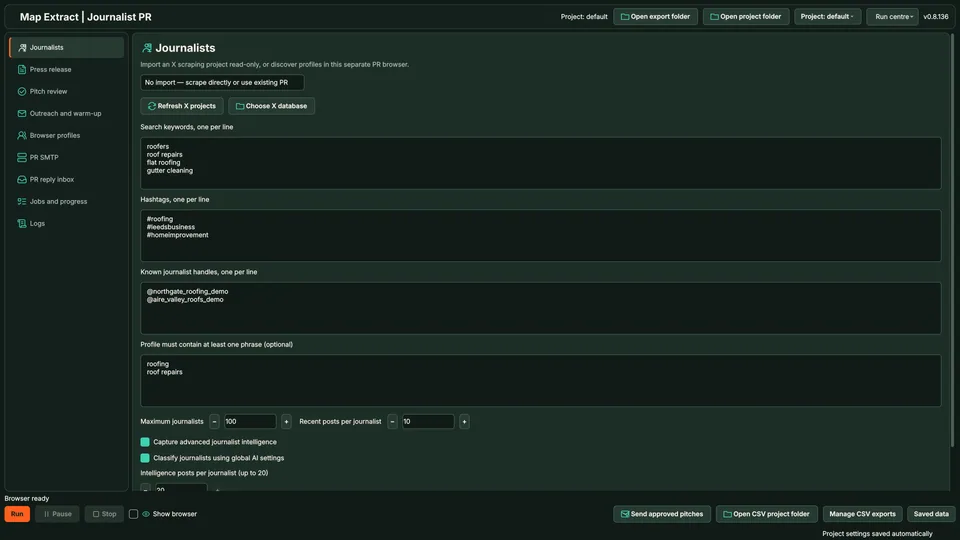
Import journalists from your X module projects, add your press release and let AI draft a pitch for each one from the release and the journalist's public posts. You approve every pitch, choose email or X DM, and a recorded reply stops further contact with that journalist.
The short versionPersonal press pitches, approved one by one.
A beta tool that drafts personalised press pitches to journalists from your X module projects, which you approve before sending.
Saves time writing individual pitches while keeping you in control of every word. Check each draft for facts before approving; X DMs are not covered by the email permission check.
Every pitch is approved by you, and a reply stops further contact.
Step by step
Use journalists found by the X module, read what each one covers and draft a pitch from your press release and their public posts. Each pitch is approved per journalist, and a reply stops further outreach to that person.
Real column names from the module schema. A field is filled only when its source publishes the value.
idjournalist_profile_idjournalist_emailtopic_keysubjectbodyhookpitch_typesent_atbcc_usedstatuserror_messageYou provide Journalist targets, recent post context and your press brief.
You get Targeted press pitches grounded in the journalist’s work and your supplied story.
Bring in journalist records from your X module projects.
Profiles and recent posts give the context for each pitch.
AI drafts a subject and pitch from the release and the journalist's posts.
You approve the exact pitch per journalist.
Approved pitches go by email or X DM at the pace you set.
Replies are linked to the journalist and stop further contact.
Keywords and source context stay with each contact.
Send each journalist a personalised press release pitch based on the topics they cover.
Result: Each journalist's contact details, personalised press release pitch and sending status.
Keep a reply from being followed by another first-contact pitch.
Result: A visible reply and a stopped outreach sequence for that journalist.
Use Map Extract lawfully and only for a legitimate purpose. Read the responsible use policy and the anti-spam policy before contacting anyone. Projects are stored locally on your Windows PC. Public business and social results the app collects are uploaded automatically to Map Extract's servers while it is licensed and running, as the Privacy Notice explains.
No. It finds journalists and sends personalised pitches through your own email or X account. It is not a newswire distribution service.
From your X module projects, where you search by keyword, hashtag or handle. Importing a journalist list from a file is not part of the current version.
The X module with a signed-in session, your press release and background facts, an SMTP sender for email and optionally a Gemini key.
Each pitch is approved per journalist before it can be sent. Caps and the action ledger still apply after approval.
It reads your PR inbox over IMAP without changing it. A reply from a journalist stops further outreach to them.
This workflow uses supplied profile evidence and supported discovery sources. It is not a subscription to a comprehensive, independently maintained media-contact database.
Explain the news, who it affects, why it matters now and the evidence behind it. Include the spokesperson and useful supporting material. A clear brief gives both you and the drafting workflow something specific to work with.
The software supports shared wording, but relevance still needs review. The personalised mode uses recent posts to help explain why your story fits that particular recipient.
Monitor #journorequest on X: the hashtag variants, search queries that cut the noise, the Latest tab, topic and deadline filters, and a fast response routine.
HARO alternatives compared for UK businesses: #journorequest, ResponseSource, SourceBottle, Qwoted, Featured and HARO itself, with sourced prices and UK reach.
Where UK journalist requests appear (#journorequest, ResponseSource, HARO, Qwoted, SourceBottle), how to qualify them, a reply template and a daily routine.
Read the PR Outreach guide, check the free demo status and the system requirements, then choose a licence for your Windows PC.