
Map Extract
Publishing · Beta

Pinterest bulk uploader for reviewed Pins

Scan image and video folders, let AI propose Pin titles, descriptions and alt text, assign boards and destination links, approve each Pin and publish on the schedule you set. Identity and metadata are checked before publishing, and an uncertain submission is never retried automatically.

  • Windows desktop app
  • Data saved in your local project
  • 20 source fields

Pinterest is a trademark of its owner. Map Extract is not affiliated with or endorsed by it.
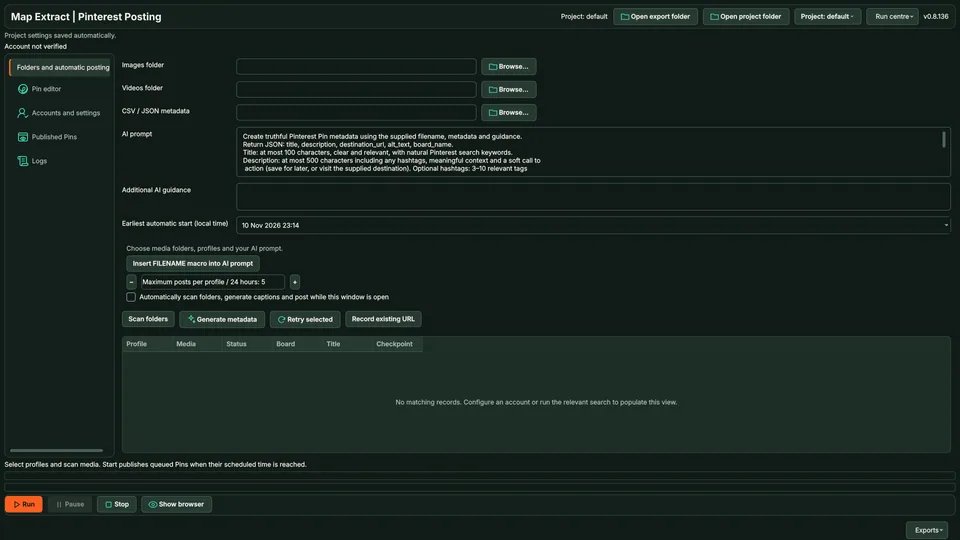
Pinterest uploader media queue with board and title columns

At a glance: Pinterest Uploader

The short versionTurn a folder of product photos into approved Pins.

What it is

A beta tool that publishes your own images and videos as Pinterest Pins, with AI-drafted titles and descriptions you approve.

What it does

  • Scans image and video folders
  • Drafts Pin titles, descriptions and alt text
  • Publishes approved Pins to your boards on a schedule

How it helps your business

Helps shops and creators get products onto Pinterest in batches, with links back to their own pages. It needs Google Chrome or Microsoft Edge installed, and scheduled Pins publish only while Map Extract is running.

Good for

  • Publishing product photos as Pins
  • Driving visitors to product pages
  • Posting to several boards in a batch

Suitable for

  • Ecommerce businesses
  • Home and interiors brands
  • Craft and gift sellers
  • Marketing agencies
  • Bloggers
Plain English: what the terms mean (2 terms)
Pin
A post on Pinterest: an image or video with a title and a link.
Alt text
A short description of an image for people who cannot see it.

See it in action

Review every post before it goes out, and never publish twice by accident.

Illustrative data. Beta modules; you sign in to your own accounts. Motion is reduced, so the finished scene is shown.

Step by step

  1. Pick a folder of your own videos or images.
  2. AI drafts a title and description from the file name and the notes you add.
  3. You edit the draft, which clears any earlier approval.
  4. You approve it.
  5. The queue uploads approved items with a random delay between them.
  6. An upload whose result is uncertain is held for you to check, never repeated automatically.
Fields and features

What you get

Approved Pins published to the right boards on your schedule, each recorded with its Pin link.

Publish your own images and videos as reviewed Pins

  • Scan local images and videosBuild a queue from folders and optional CSV or JSON metadata.
  • Write the Pin informationSet the title, description, alt text, board and destination URL for each item.
  • Choose accounts and timingUse saved profiles, board defaults and supported scheduling controls.
  • Keep the published Pin linkRecord the result, attempts and Pin URL with the original media file.

Field names20 field names

Real column names from the module schema. A field is filled only when its source publishes the value.

Pinterest Uploader record20Saved record
  • id
  • profile_id
  • file_path
  • file_name
  • media_type
  • sha256
  • status
  • title
  • description
  • destination_url
  • alt_text
  • board_name
  • pin_url
  • post_timestamp
  • checkpoint
  • metadata
  • attempts
  • error
Show 2 more fields
  • account_handle
  • scheduled_for
5 steps

How it works

You provide Image and video folders, optional CSV or JSON metadata and Pinterest profiles.

You get Pinterest Pins on the selected boards with destination links and recorded Pin URLs.

  1. Scan the media folders

  2. Generate title, description, destination and alt text

  3. Review the pin and choose its board

  4. Set profile order and timing

  5. Publish and save the live pin URL

PINTEREST · AUTOMATED PUBLISHING

From your media folder to your profile

● ● ● pinterest.com
Ⓟ PinterestMeadow Ceramics · Create a post
▧

spring-collection.jpg

The software selects the next file in your folder.

File selected ✓
The software selects media from your chosen folder.File 1 / 3
Use cases

Where Pinterest Uploader fits

  • Social media publishing
  • Social media traffic
  • Social account growth

Schedule Pinterest product Pins

Turn local images and videos into Pins with boards and destination links.

Responsible use

Safeguards and responsible use

Settings you control

Media and metadata
Import images or videos with their titles, descriptions and links.
Boards and schedule
Set the destination board and not-before time.
Accounts and pacing
Choose the verified profiles and posting intervals.

Good to know

  • Uses a dedicated Chrome profile; Google Chrome is expected to be installed.
  • Scheduled Pins publish only while Map Extract is running.
  • Defaults: 10 Pins per run, 60 to 120 second delays and up to 2 retries.

Use Map Extract lawfully and only for a legitimate purpose. Read the responsible use policy. Projects are stored locally on your Windows PC. Public business and social results the app collects are uploaded automatically to Map Extract's servers while it is licensed and running, as the Privacy Notice explains.

Questions

Pinterest Uploader FAQ

Does Pinterest need Google Chrome?

The uploader drives a dedicated Chrome profile, so install Google Chrome before using it.

Can I import existing Pin metadata?

Yes. The queue supports CSV or JSON metadata. Inspect how each row matches its local media file before publishing.

Can every Pin have a different destination?

Review each item's destination URL in the editor. Account defaults can help preparation, but the final item should point to the page intended for that Pin.

Will scheduled Pins publish while my PC is off?

The local queue requires the application running. A not-before time determines eligibility; it is not a hosted publishing service.

Can I set alt text?

Alt text is part of the Pin metadata workflow. Use a useful description of the actual media rather than unrelated promotional keywords.

How do I know a Pin was published?

Review its recorded confirmation and Pin URL. A prepared queue item or attempted browser action alone is not proof of publication.

Can each Pin link to a different page?

Set the destination URL for each Pin together with its title, description, image and board. Check that the link matches the content before publishing.

Guides

Related guides

Start with one small run you can check

Read the Pinterest Uploader guide, check the free demo status and the system requirements, then choose a licence for your Windows PC.

Top