
Lead Generation industry newsletters
Collect newsletter subscription evidence and received messages for lead generation.
Paste business websites or reuse them from your scraper projects. Map Extract finds signup forms, including ones inside embedded frames, optionally subscribes your dedicated inbox, then reads incoming newsletters and matches each sender to a known business.
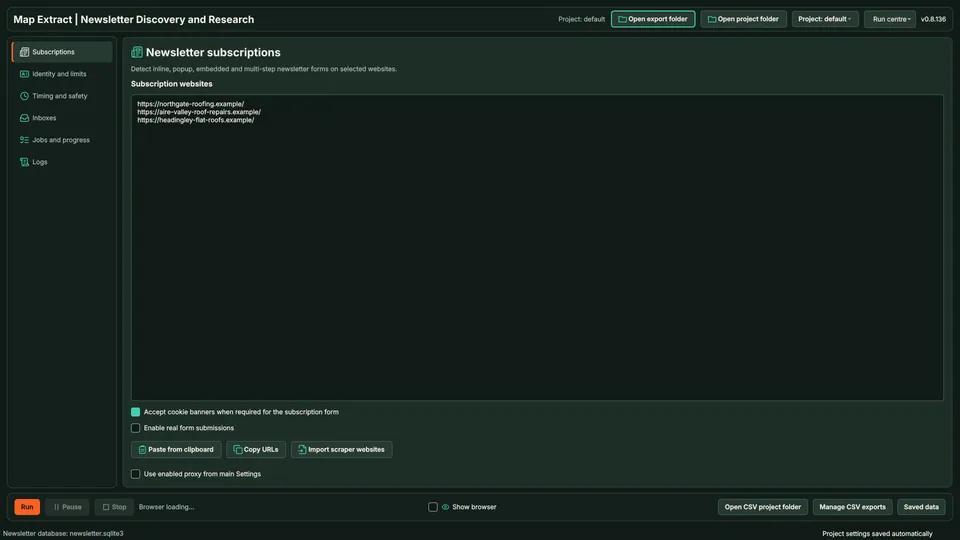
The short versionLearn how businesses on your list market themselves by email.
A beta tool that checks a list of business websites for newsletter signups and reads what those businesses send.
See how competitors and prospects market themselves by email: what they offer, how often they send and what they promote. It starts from your website list; it does not search for newsletters by subject.
Start with a list of business websites. Map Extract finds their newsletter signup forms, can subscribe a dedicated inbox you control, and reads the newsletters that arrive to record who is publishing and what they send.
Real column names from the module schema. A field is filled only when its source publishes the value.
idaccount_idmessage_uidsender_emailsender_domainmatched_businesswebsite_found_in_bodyemail_subjectemail_dateunsubscribe_linksnewsletter_scoredeleted_after_scrapebody_rawscraped_atYou provide Newsletter websites, your subscriber identity and a connected inbox.
You get Subscription records and received newsletter content for lead generation.
Add business websites from a list or a project.
The browser finds each newsletter signup form.
Your dedicated identity is entered and the result recorded.
Incoming messages are read and scored as newsletters.
Sender, domain, subject, date and unsubscribe links are saved.
Each sender is linked to a known business record.
Website and contact details come from your project records.
Collect newsletter subscription evidence and received messages for lead generation.
Use Map Extract lawfully and only for a legitimate purpose. Read the responsible use policy and the anti-spam policy before contacting anyone. Projects are stored locally on your Windows PC. Public business and social results the app collects are uploaded automatically to Map Extract's servers while it is licensed and running, as the Privacy Notice explains.
No. It starts from a list of websites you supply or collected with other modules. Use the search or maps scrapers to build that list first.
A website list, a name and dedicated inbox you control, and access to that inbox for reading newsletters.
No. It subscribes your inbox and reads what arrives. Use Bulk Email Sender for outbound campaigns.
Not automatically. Many publishers send from mailing services or no-reply addresses. Check the address and business match before any outreach.
Pending confirmation is recorded and the inbox is checked. Confirming every subscription automatically is not promised.
No. This module researches other newsletters and their signup paths. Use the separate email workflow for your own reviewed recipient campaigns.
Yes. Discovery and subscription actions are separate. Review the source list before enabling signup submissions.
It keeps lead generation mail organised and makes it easier to identify which source produced each message. You must control the address used for subscriptions.
Monitor #journorequest on X: the hashtag variants, search queries that cut the noise, the Latest tab, topic and deadline filters, and a fast response routine.
HARO alternatives compared for UK businesses: #journorequest, ResponseSource, SourceBottle, Qwoted, Featured and HARO itself, with sourced prices and UK reach.
Where UK journalist requests appear (#journorequest, ResponseSource, HARO, Qwoted, SourceBottle), how to qualify them, a reply template and a daily routine.
Read the Newsletter Lead Generation guide, check the free demo status and the system requirements, then choose a licence for your Windows PC.