
Lead Generation an industry
Move from a broad topic to a reviewable list of accounts.
Result: Profile records with public-source context for your next lead generation or outreach decision.
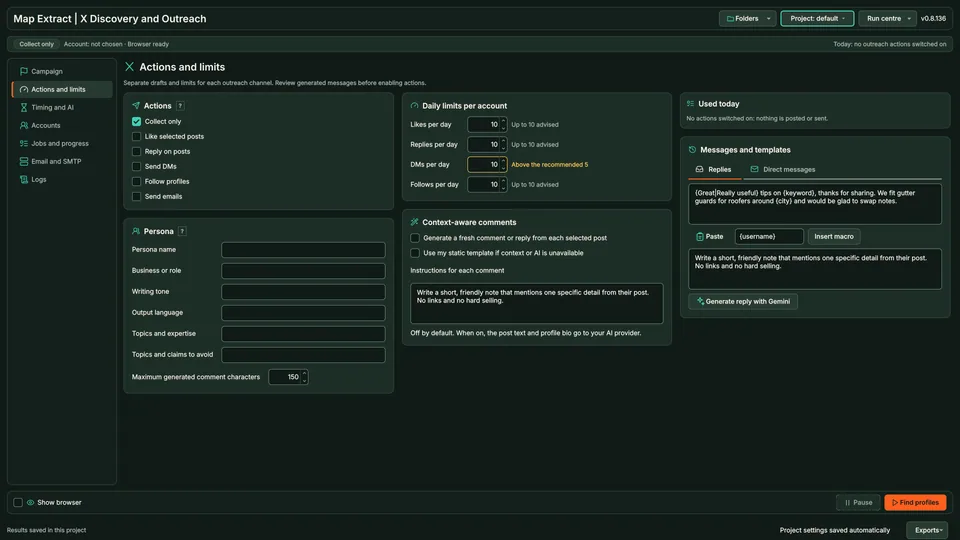
Search X by keyword, hashtag or handle, read bios and posts and collect public profile details and website contacts. Scraping only is on by default; follows you enable are capped at 10 a day and 3 per 30 minutes, with delays and cooldowns. DMs and replies are capped at 10 per day by default.
X is a trademark of its owner. Map Extract is not affiliated with or endorsed by it.
The short versionFind who is talking about your topic on X, with strict action limits.
A beta tool that finds X profiles and posts by keyword, hashtag or handle, with optional follows, DMs and replies under daily caps.
Find people and businesses talking about your topic on X and see their public details. Collection settings are separate from message limits, DMs are not covered by the email permission check, and platforms can suspend accounts.
Find people and businesses discussing your market on X, including journalists asking for comment. Collect first, and enable actions only where you have a lawful reason.
Real column names from the module schema. A field is filled only when its source publishes the value.
idhandledisplay_namebio_textbio_emailsbio_linkswebsitelocationfollowers_countfollowing_countprofile_picture_urlrole_tagstopic_tagssource_urlcreated_atupdated_atYou provide X keywords, hashtags, account names and profile filters.
You get X business profiles, available emails and targeted message drafts.
Choose keywords, hashtags or handles.
Posts and bios are read in the module's browser profile.
Website links are followed for published contacts.
Check profiles before any action.
Replies, DMs or follows run only if you enable them, within limits.
Records and action history are saved locally.
Choose keywords, hashtags or handles.
Move from a broad topic to a reviewable list of accounts.
Result: Profile records with public-source context for your next lead generation or outreach decision.
Use the right message for a reply, DM or email.
Result: Distinct action records rather than one generic 'contacted' label.
Use Map Extract lawfully and only for a legitimate purpose. Read the responsible use policy and the anti-spam policy before contacting anyone. Projects are stored locally on your Windows PC. Public business and social results the app collects are uploaded automatically to Map Extract's servers while it is licensed and running, as the Privacy Notice explains.
A browser profile signed in to an X account you are authorised to use. A Gemini key is optional, and SMTP only for email.
Yes. Scraping only is on by default.
Follows: by default 10 a day and no more than 3 in any 30 minutes, with 180 second delays, random variation and cooldown days. DMs and replies are capped at 10 per day by default. Collection settings, such as how many profiles or posts to read, are separate and are not message allowances.
Yes. Journalist Request Monitoring and PR Outreach read journalist records from this module.
Third-party platforms may restrict data collection or automated actions. Before running a workflow, check the platform's rules and make sure you have permission for the actions you configure. Platforms can restrict or suspend accounts. The module is in beta.
No. X Automation starts with discovery and profiles. X Auto-Posting starts with your own text or media queue and publishes prepared posts.
Yes. Keep the outreach actions disabled while collecting and reviewing profiles.
No. Recipient settings and the signed-in account affect availability. An unavailable control should be recorded, not mistaken for delivery.
Find local businesses on Instagram, Facebook, TikTok, X and YouTube: start from websites, match profiles by domain, read public fields and respect limits.
What Instagram's 'we limit how often you can do certain things' message means, what Instagram actually says, why quoted limits differ, and how to pace safely.
X's published DM limit is 500 a day, but most messages fail for other reasons: recipient settings, filtered requests, rate limits and automation rules.
Read the X Discovery and Outreach guide, check the free demo status and the system requirements, then choose a licence for your Windows PC.