
Submit relevant contact form enquiries
Find the intended enquiry route and submit a reviewed message to a business website.
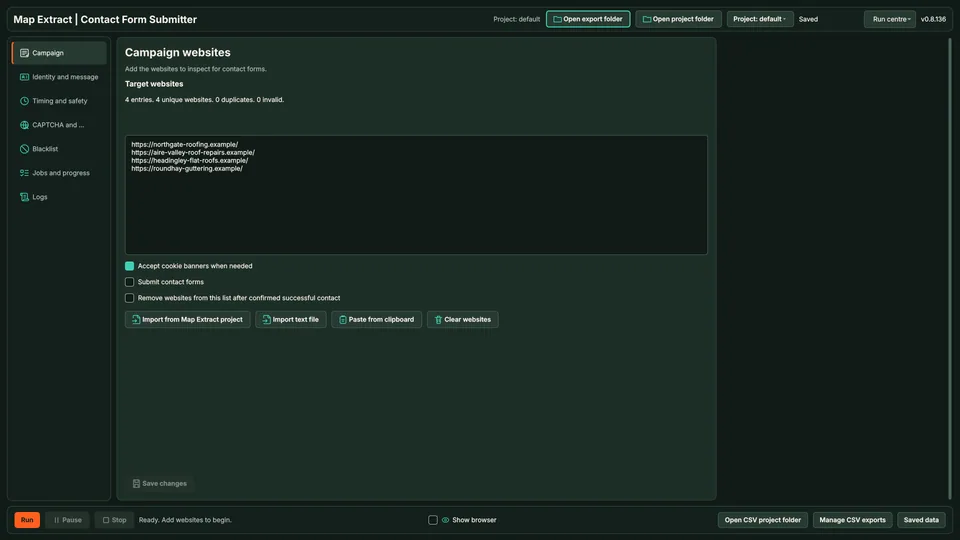
Give Map Extract a reviewed list of business websites and your message. It finds each contact page, maps your details into the visible fields and, only once you enable live submissions, submits at a measured pace and records an outcome for every site.
The short versionYour approved message, sent through contact forms at a careful pace.
A tool that fills in business website contact forms with your approved message. Needs setup, and live sending is off by default.
Reach businesses that only offer a contact form, with a clear record of what happened on each site. The email permission check does not cover forms, so check your do-not-contact list yourself.
Your approved message goes into the form; anything uncertain is set aside.
Step by step
Send a relevant enquiry through the contact form a business publishes, from a list you have reviewed. Live submission is off until you turn it on, and each website gets a recorded outcome.
Real column names from the module schema. A field is filled only when its source publishes the value.
idwebsiteemailmessage_hashstatepage_urldetailattemptscaptchaupdated_atYou provide Business website URLs, your sender details and the message to submit.
You get A website-by-website record of submission results and forms that could not be completed.
Add the business websites you have checked, plus your sender identity and message.
The browser follows contact links and sitemaps to find the form and its visible fields.
Your details and the business name or domain fill the fields. Optional Gemini rewriting can vary the wording.
CAPTCHA type is detected and the site is marked for manual handling.
With live submissions enabled, the form is submitted and the page checked for a confirmation or an error.
The outcome is saved per site and the next site follows after the set delay.
| Business | Website | City | Status |
|---|---|---|---|
| Moorland Dental Studio | https://moorlanddentalstudio.example/contact | Sheffield | Queued |
| Parkside Dental Care | https://parksidedentalcare.example/contact | Sheffield | Queued |
| Abbey Lane Dentistry | https://abbeylanedentistry.example/contact | Sheffield | Queued |
The software loads its business names, websites and contact details into your campaign.
Find the intended enquiry route and submit a reviewed message to a business website.
Use Map Extract lawfully and only for a legitimate purpose. Read the responsible use policy and the anti-spam policy before contacting anyone. Projects are stored locally on your Windows PC. Public business and social results the app collects are uploaded automatically to Map Extract's servers while it is licensed and running, as the Privacy Notice explains.
A reviewed list of business websites, your sender name, email and message, and Map Extract on Windows. A Gemini key is optional.
No. Live submissions are off by default. Run it first to find forms, check the results, then enable live submission.
The challenge is detected and the website is recorded for manual handling. It is not counted as a successful submission.
Not in the current version. Contact forms use the module's own blocklist, so check each site against your suppression list and the anti-spam policy before enabling live submission.
No. It means the website showed a confirmation. A reply is a separate outcome.
The attempt is logged without counting as a submission. Check the site or your inbox before trying again.
Yes. Leave submission disabled to collect form detection results first. Enable submissions only after checking your targets, identity and message.
No. Required fields, unsupported widgets, access restrictions and changed forms can need manual input. The results distinguish those conditions from successful submission.
When to use website contact forms for B2B outreach, how to write for the person triaging the inbox, field mapping, CAPTCHAs, opt-outs and the records to keep.
A decision flow for PECR: which UK businesses are corporate subscribers you may email, which count as individuals, and how to tell from public records.
Find contact page URLs across a list of websites: menu and footer links, sitemaps, common paths, telling contact forms from other forms, and multiple forms.
A fill-in legitimate interests assessment for B2B email, worked through for a fictional consultancy using the ICO's purpose, necessity and balancing tests.
Is cold emailing legal in the UK? How PECR and UK GDPR apply to B2B email, who counts as a corporate subscriber, and what the 2025 Data Act changed.
Read the Contact Form Submitter guide, check the free demo status and the system requirements, then choose a licence for your Windows PC.