
How to extract contact data from websites
Follow the complete setup and run process for this module. You will start with a list of business website URLs, work through each control in order and finish with enriched business records with website-sourced contact details.
Step 1: Open Websites
Select Websites under Scraping and extraction. Keep existing project records unless you intend to remove them. Clearing the entire project is not a setup requirement.
Step 2: Add authorised targets
Enter one domain or URL per line. Use Paste or Import Notepad file for a list. Check the target scope before queueing.
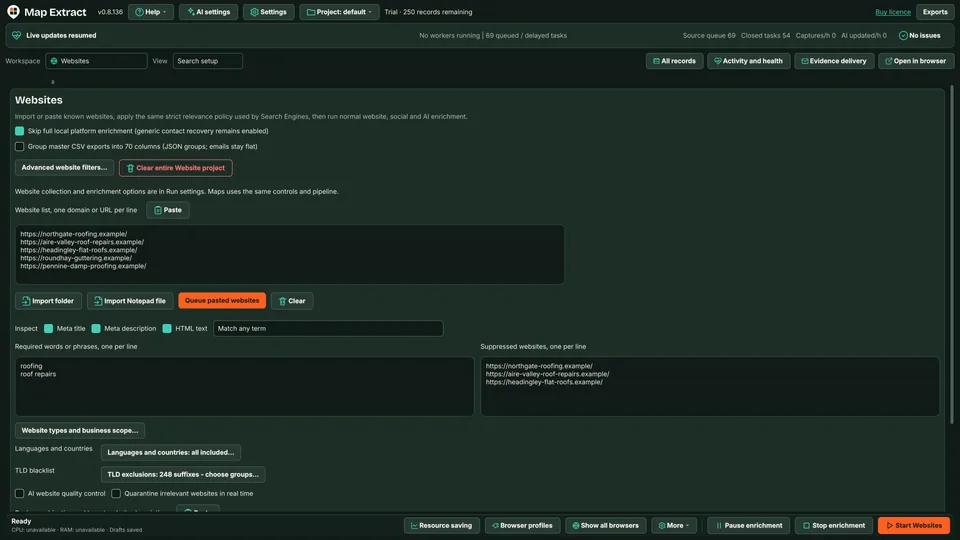
Website list with Paste, Notepad import, queueing and inspection options. Step 3: Choose inspection and matching
Select Meta title, Meta description and HTML text as needed. Match any term accepts a match to any listed term. Match all terms requires every listed term.
Step 4: Set required words and exclusions
Enter required words or phrases, one per line. Add unwanted domains to Suppressed websites. Check that your rules do not exclude intended businesses.
Step 5: Set language and domain endings
Choose Language and review the TLD blacklist.
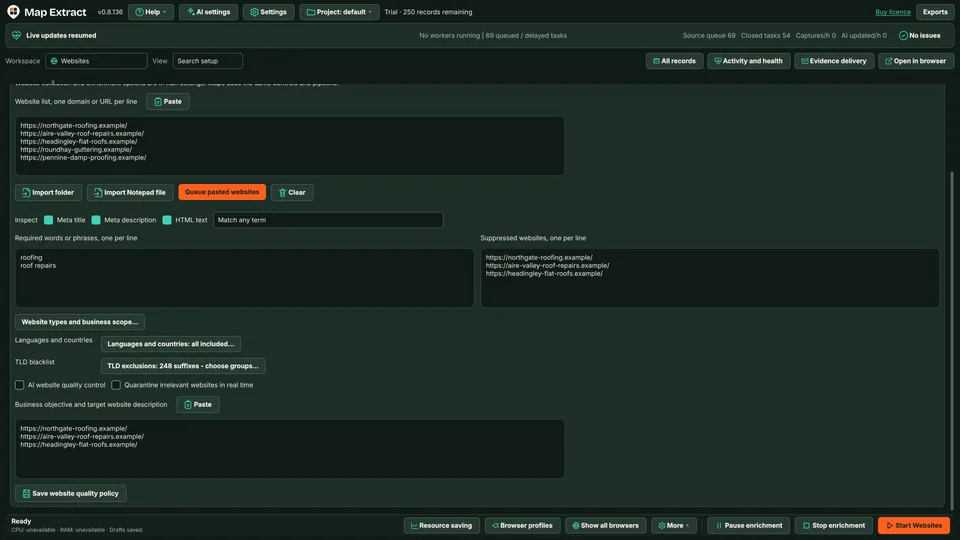
Required terms, suppressed sites, language, TLD blacklist and AI quality controls. Step 6: Review AI quality controls
Optionally enable AI website quality control and Quarantine irrelevant websites in real time. Inspect decisions before applying the policy to a large batch.
Step 7: Save the business objective
Describe ideal prospects and exclusions, then Save website quality policy.
Step 8: Queue and start
Choose Queue pasted websites. Inspect Browser profiles and Preview browser where needed, then Start. Review main project records and source observations before CSV export.
Check the result
A local B2B database with business contacts, website and social details, ready for CSV export and reviewed outreach.
- robots.txt is respected; blocked, parked and dead sites are recorded and set aside.
- Websites publish different details, so fields can be missing or conflict. Evidence is kept rather than guessed.
- A published address is not permission to send marketing.
Read the responsible use guidance before you run this module on real data.
Troubleshooting
- The expected input or account is missing
- Recheck the prerequisites: Project; Authorised target sites; Crawl scope and limits.
- The output is incomplete or unavailable
- Only publicly accessible and authorised pages are in scope.
- The job was interrupted
- Pause or stop the supported local job controls, then inspect its recorded state. Resolve a blocked account or source before restarting. Check the destination before repeating any action whose outcome is uncertain.
Questions
What setup does Website Crawler require?
A list of business URLs or websites found by the other scrapers. Project. Authorised target sites. Crawl scope and limits.
What does the connector produce?
It can retain page URLs, structured fields from HTML and JSON LD, published contacts and observed social links. Results depend on page content and access.
How does relevance filtering work?
Select which text sources to inspect, set required terms and choose any or all term matching. Suppressed websites and the TLD blacklist add exclusions.
What does AI website quality control do?
It assesses websites against your business objective. The separate quarantine option controls handling of irrelevant sites. Review the evidence and decisions; AI checks can be wrong.
Can I import websites in bulk?
Yes. Paste one domain or URL per line, or import a Notepad file. Review the policy before Queue pasted websites. Clearing the entire project is not needed to add a batch.
How does this connect to other modules?
Use Websites to inspect known domains, including those found through Search Engines or Maps. Observed social links can support further lead generation. Review records before additional actions or export.
Next steps
Follow along in the free demo
Install Map Extract on Windows and work through these steps with a small test project.