
How to scrape business directory listings
Follow the complete setup and run process for this module. You will start with a directory, category, location and result limit, work through each control in order and finish with a structured company list from the selected directory.
Step 1: Locate Directories
Go to Scraping and extraction and select Directories.
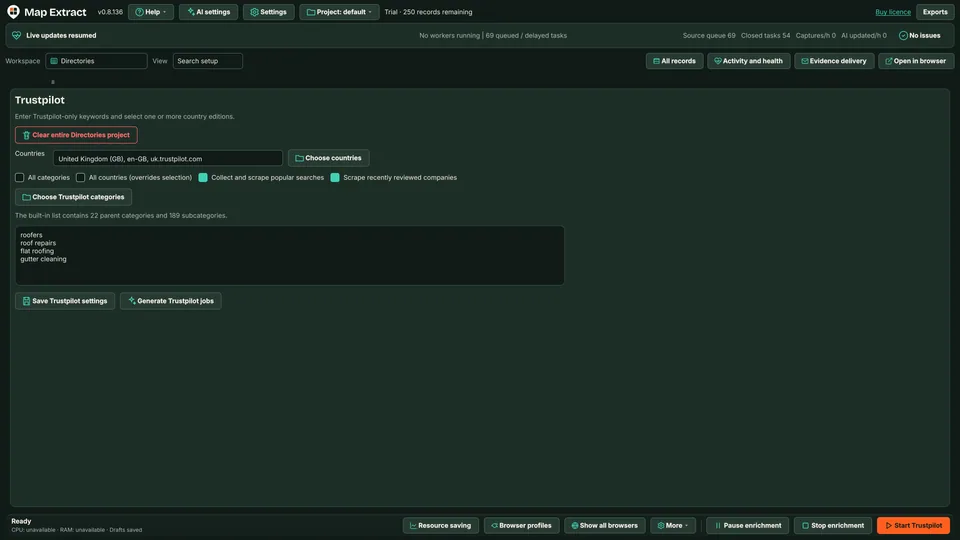
Figure 1. Directory configuration identifies the lead generation source. Trustpilot settings with a country edition and sample keywords. Step 2: Configure and inspect
Choose a supported source and review its query settings. Paging and available fields vary by directory. Keep the first query bounded.
Step 3: Run a small source job
Use the supported Workflow Builder source step. Check Activity for blocked or unsupported pages. Pause or stop through local controls if needed.
Step 4: Review records
Compare business identity, location and source URL before enrichment or CSV export. Exports are derived copies, not the database of record.
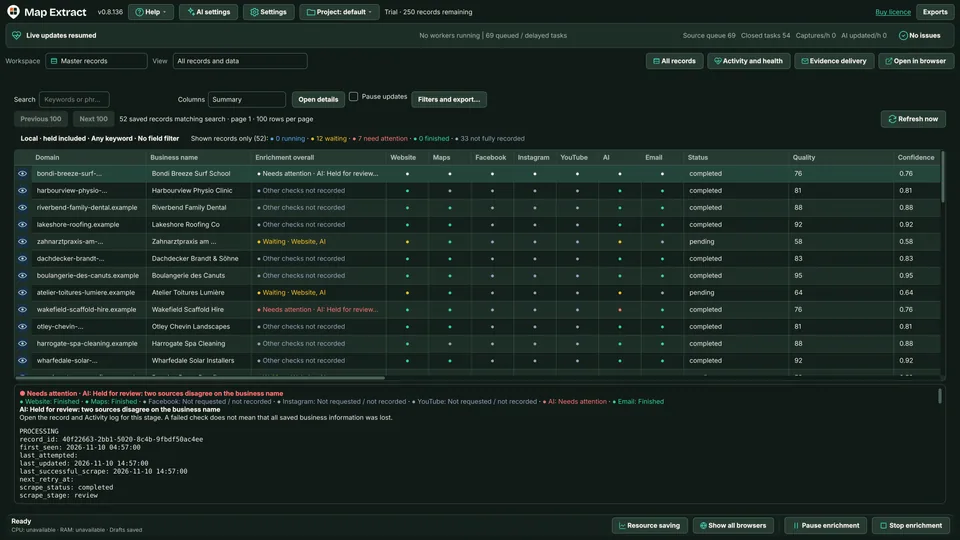
Figure 2. Review listing evidence in project records.
Check the result
A local B2B database with business contacts, website and social details, ready for CSV export and reviewed outreach.
- Trustpilot is the directory source in the current version.
- Listing fields and paging vary by country site.
- A directory listing is not a verified business contact on its own.
Read the responsible use guidance before you run this module on real data.
Troubleshooting
- The expected input or account is missing
- Recheck the prerequisites: Project; Supported directory access; Bounded query.
- The output is incomplete or unavailable
- Only Trustpilot interfaces are in scope.
- The job was interrupted
- Pause or stop the supported local job controls, then inspect its recorded state. Resolve a blocked account or source before restarting. Check the destination before repeating any action whose outcome is uncertain.
Questions
What setup does Business Directory Scraper require?
A Trustpilot, country and business search query. Project. Supported directory access. Bounded query.
What does Business Directory Scraper produce?
Structured business records with directory source URLs and available contact data.
What should I check before using Business Directory Scraper?
Check that directory interface is supported, that query is bounded and that you have reviewed Records before export or enrichment. Check Activity for blocked pages.
How does it differ from Google Maps Scraper?
Maps extracts available listings from enabled Maps platforms using a location matrix. Directory Scraper extracts from Trustpilot business listings. Use both as lead generation sources; neither promises complete coverage.
Can I enrich directory results with website data?
Yes. After Records validation, send observed sites to Websites module for crawling and structured data extraction of HTML and JSON LD and public contacts and social URLs.
What happens if a directory blocks access?
Pause or stop the job using local controls, inspect recorded state, resolve blocked account or source, then restart. Check destination before repeating any action whose outcome is uncertain.
Next steps
Follow along in the free demo
Install Map Extract on Windows and work through these steps with a small test project.